CASE STUDY
Designing a logistics operations platform from fragmented tools
A role-based internal platform for logistics teams — built to support pickup-point requests, shipment management, route configuration, and operational control at scale.

Overview
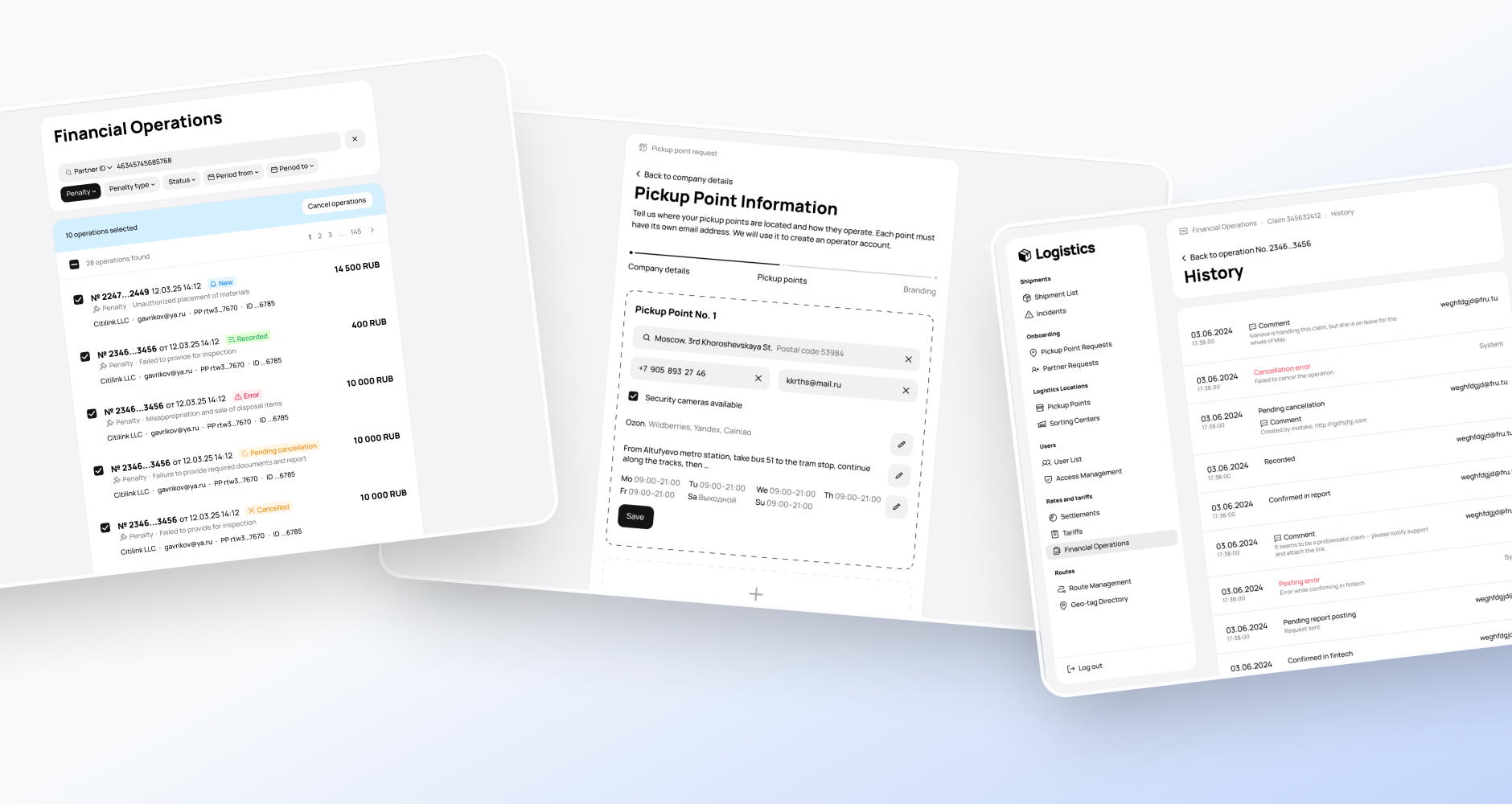
I designed a role-based internal platform for logistics operations, bringing fragmented workflows into one system used by internal teams to manage pickup-point requests, shipments, routes, and related operational scenarios.
I was the only designer on the platform and worked end-to-end across workflow design, information architecture, UI, edge cases, handoff, and implementation support.
Context
As the delivery network grew, the operational model became more complex. New logistics entities were being introduced, while the existing tools no longer matched the needs of a growing network.
Part of the work was still spread across spreadsheets, legacy admin tools, dashboards, support channels, and manual checks. Some workflows existed only in partial form; others did not exist as system tools at all.
The goal was to create a single operational product that could support growth without turning internal operations into a bottleneck.
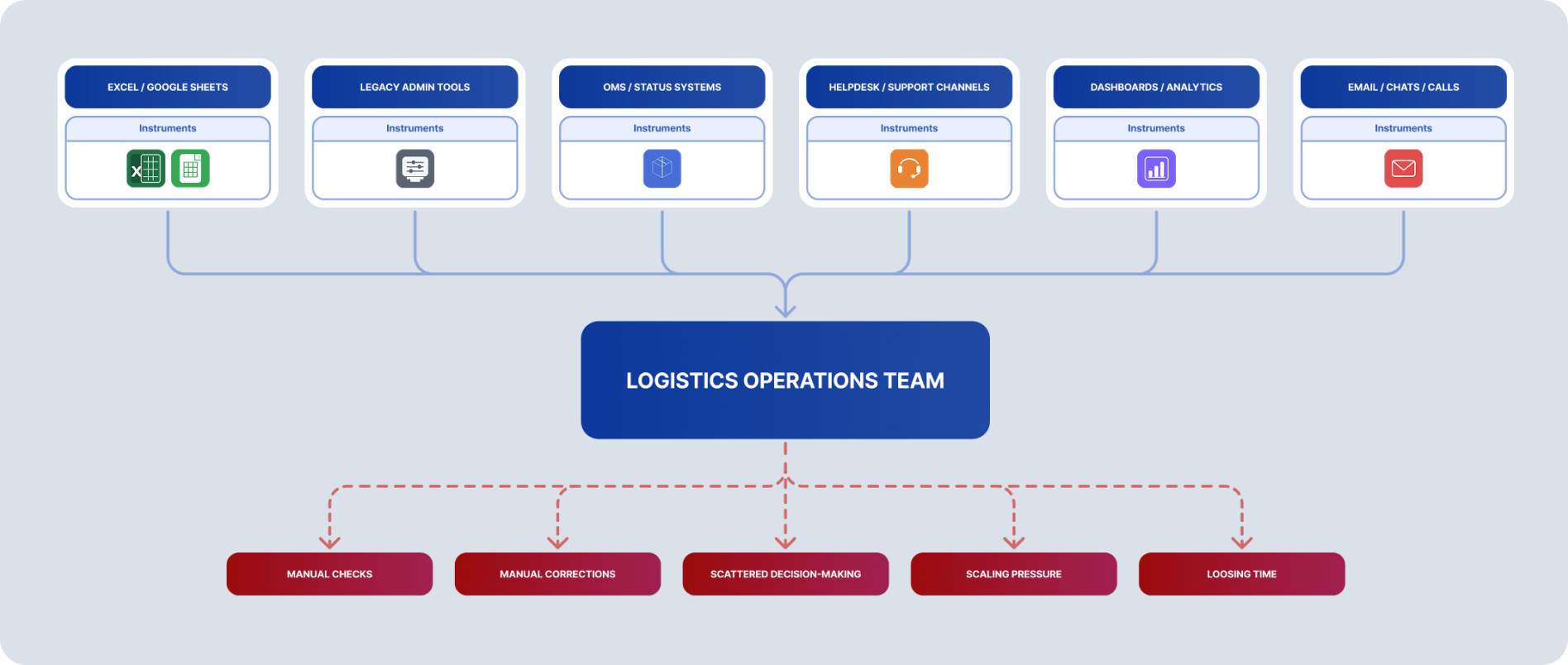
Text description: Operational context
Before
- Excel / Google Sheets
- Legacy admin
- Helpdesk / support
- Dashboards / manual checks
- Scattered workflows
Consolidated into
Need
One operational platform for managing requests, locations, shipments, routes, and related actions in one place.
Before / Need
Problems
Fragmented workflows
Teams had to switch between multiple tools, cross-check information manually, and rely on support or developers when something broke.
Limited scalability
The toolset was not ready for a growing network, new pickup points, and more complex logistics scenarios.
Unclear operational logic
Statuses, terminology, permissions, and actions needed stronger structure to support both daily work and future growth.
Users and roles
The platform was built for internal operational teams with different levels of responsibility:
- logistics specialists handling shipment-related operations
- special agents working with more critical route-related changes
support specialists who needed deeper operational visibility in specific cases
- administrators and leads with broader access
- trainees with read-only visibility during onboarding
Pickup-point owners were not direct users of the platform. Their only touchpoint was status communication through email flows related to pickup-point requests and follow-up actions.
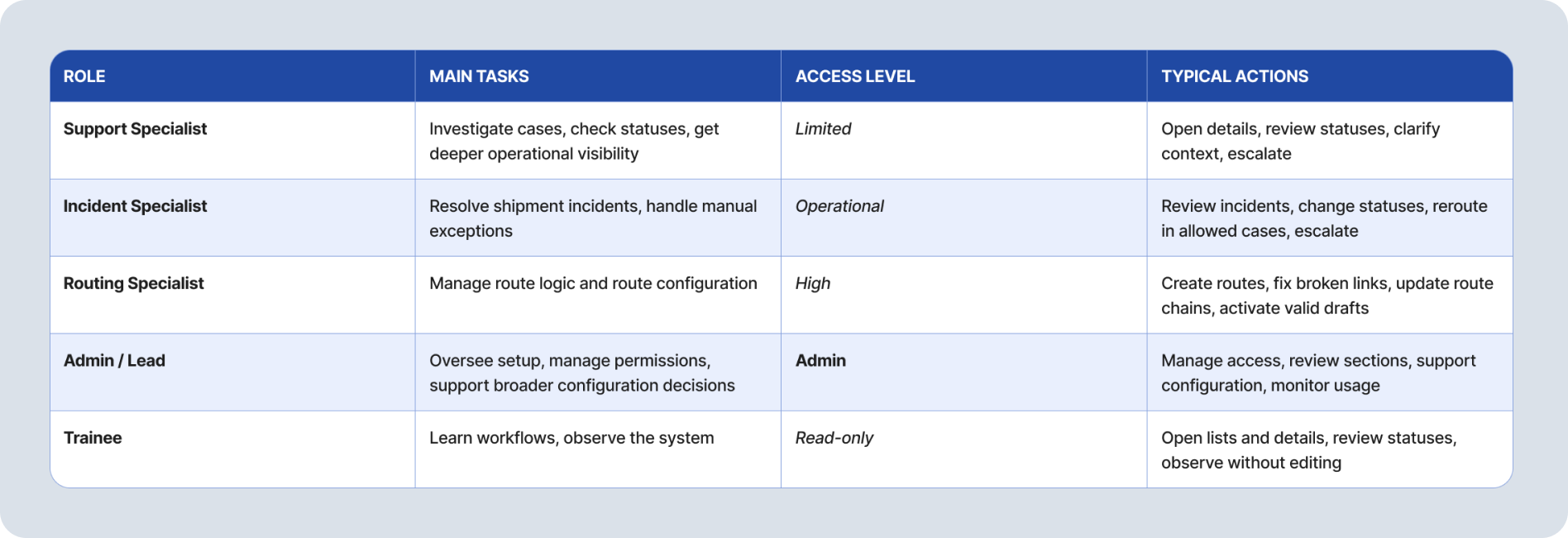
Text description: Users and roles
| Role | Main tasks | Access level | Typical actions |
|---|---|---|---|
| Support Specialist | Investigate cases, check statuses, get deeper operational visibility | Limited | Open details, review statuses, clarify context, escalate |
| Incident Specialist | Resolve shipment incidents, handle manual exceptions | Operational | Review incidents, change statuses, reroute in allowed cases, escalate |
| Routing Specialist | Manage route logic and route configuration | High | Create routes, fix broken links, update route chains, activate valid drafts |
| Admin / Lead | Oversee setup, manage permissions, support broader configuration decisions | Admin | Manage access, review sections, support configuration, monitor usage |
| Trainee | Learn workflows, observe the system | Read-only | Open lists and details, review statuses, observe without editing |
Product scope and system complexity
The platform was not a single-feature admin panel. It combined several operational areas into one system: pickup-point requests, pickup points, shipments, incidents, routes, geo-tags, partner entities, user roles, and financial operations such as claims and penalties.
These objects were closely connected. An approved partner request created a pickup point; pickup points were linked to route and geo-tag logic; shipments moved through those points and routes; incidents and financial operations could be tied to the same operational chain.
This created several layers of complexity:
- many interconnected entities
- status-heavy workflows
- risky actions affecting many shipments or points
- role-based restrictions
- the need to support future logistics entities and more complex route logic
A big part of the design challenge was making this logic readable and usable without flattening the domain too much.

Text description: Product scope map
Shipment list
- Shipment list
- Search and filter
- Batch status updates
- Batch rerouting
Shipment
- Update status
Incidents
- List of incidents
- Search and filter
- Batch close
- Create incident
Incident
- Resolve incident
PP Requests
- List of requests
- Search and filter
- Batch approve / reject
Pickup Point Request
- Reliability check
- Contact partner
- Approve / reject
Partner requests
- List of requests
- Search and filter
- Batch approve / reject
Partner request
- Contact partner
- Approve / reject
Pickup points
- List of PP
- Search and filter
- Batch status updates
- Create pickup point
Pickup point
- Update information
- Manage services
- Reroute shipments
- Open / close
Sorting centers
- List of SC
- Search and filter
- Batch status updates
- Create sorting center
Sorting center
- Update information
- Open / close
User list
- List of users
- Search and filter
- Enable / disable access
- Create user
User
- Update information
Settlements
- List of Settlements
- Add settlement
Settlement
- Update information
Tariffs
- List of Tariffs
- Add tariff
- Deactivate tariff
Tariff
- Update information
Financial operations
- List of operations
- Search and filter
- Add penalty
- Add claim
Operation
- Update information
Route management
- List of routes
- Search and filter
- Create route
- Change provider
Route
- Update information
- Deactivate
- Activate
Geo tag directory
- List of Geo tags
- Search and filter
- Create geo tag
Geo tag
- Update information
Information architecture
The platform was structured primarily around entities rather than task lists. Users usually already knew what operational task they needed to perform; the design challenge was to help them quickly find the right object, understand its current state, and take the correct action.
A key part of the work was deciding what information belonged in list views and what should stay on detail pages. Users were used to spreadsheets and often expected table-heavy interfaces, but reproducing that pattern everywhere would have made the product dense in the wrong way.
Instead, I introduced more structured list views with filters, strong status visibility, and clear information hierarchy, while keeping deeper details and histories inside dedicated object pages.
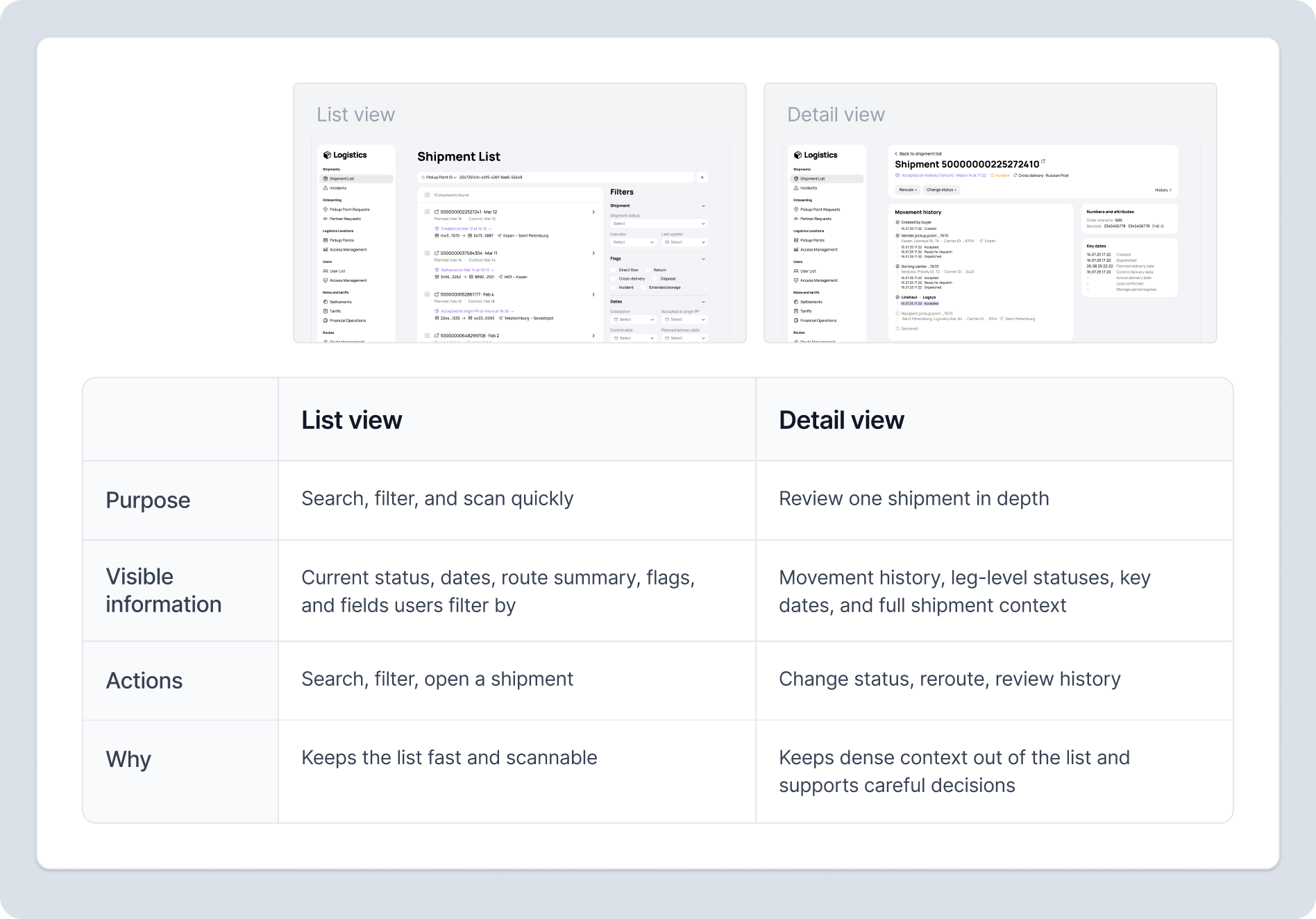
Text description: List view vs Detail view
List view
- Purpose
- Search, filter, and scan quickly
- Visible information
- Current status, dates, route summary, flags, and fields users filter by
- Actions
- Search, filter, open a shipment
- Why
- Keeps the list fast and scannable
Detail view
- Purpose
- Review one shipment in depth
- Visible information
- Movement history, leg-level statuses, key dates, and full shipment context
- Actions
- Change status, reroute, review history
- Why
- Keeps dense context out of the list and supports careful decisions
Pickup point requests
KEY WORKFLOW 1
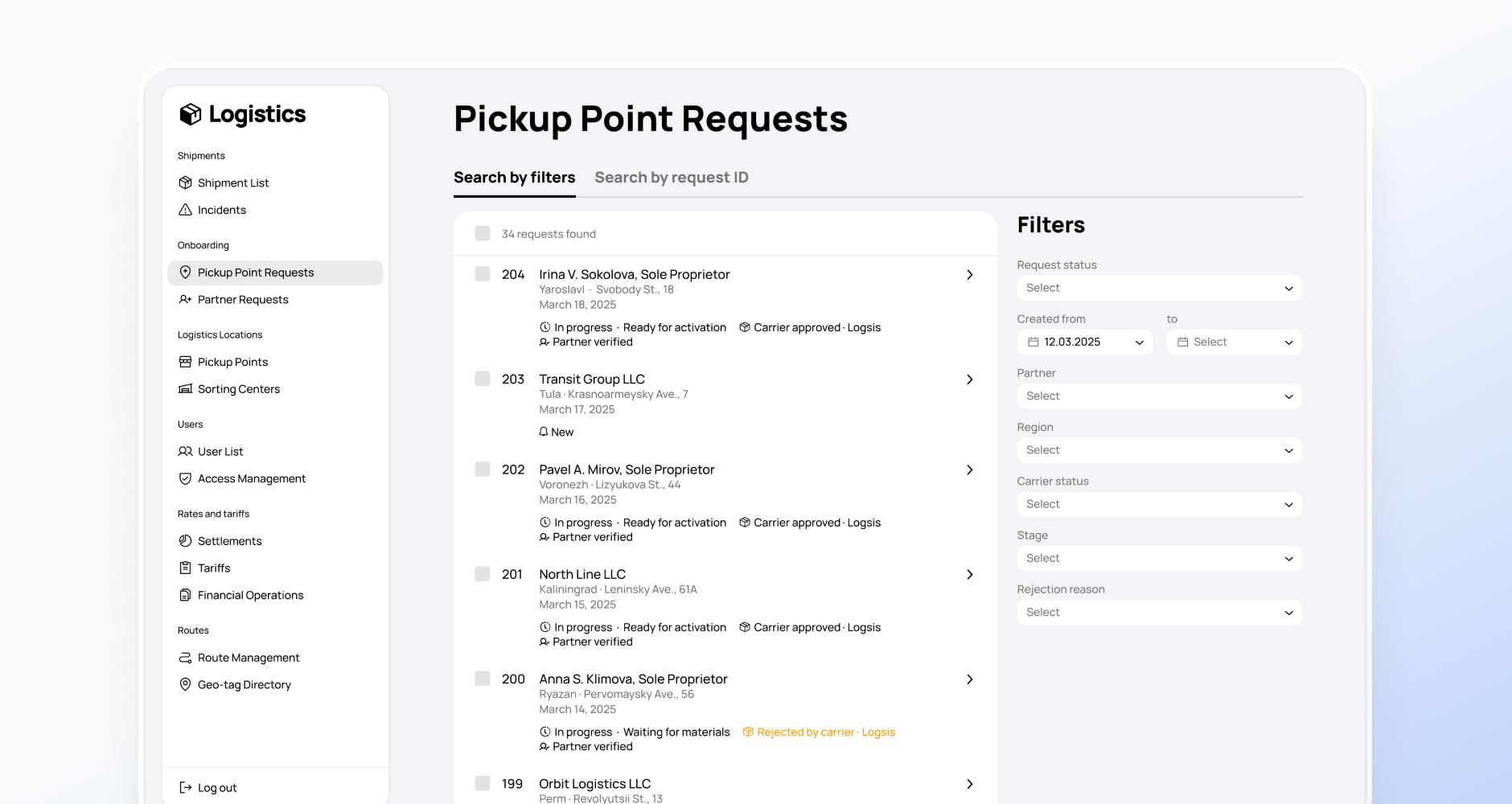
One of the first major workflows in the platform was processing pickup-point requests.
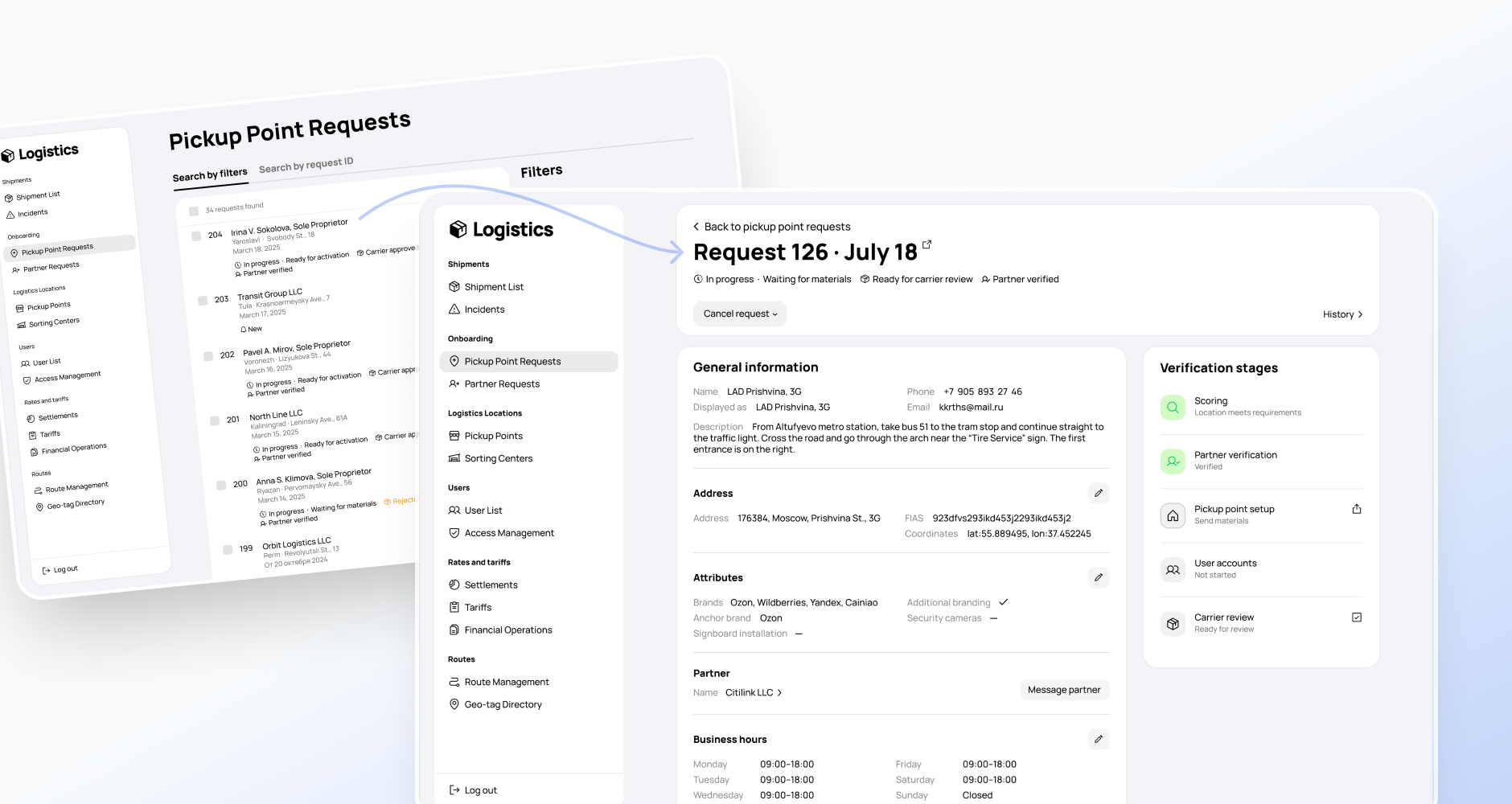
The goal was to help logistics teams review incoming applications, check whether a pickup point met business and operational requirements, and make a clear decision: approve, reject, or return later if the point could become relevant in the future.
Before that, much of the verification process was scattered across different systems. Teams had to collect and compare information manually, including geography, partner checks, and operational readiness.
I consolidated that decision-making into one place without turning the queue into a raw data dump. I chose a card-based list view instead of a table-first approach, even though users initially expected spreadsheet-like layouts. The card format made stages, statuses, and decision signals easier to scan, while more detailed checks stayed in the object page.
After launch, we continued iterating on the flow. One improvement was adding more detailed partner reliability information directly into the platform, so users no longer had to leave the tool to complete the review.
Route configuration
KEY WORKFLOW 2
Another critical area was route management.
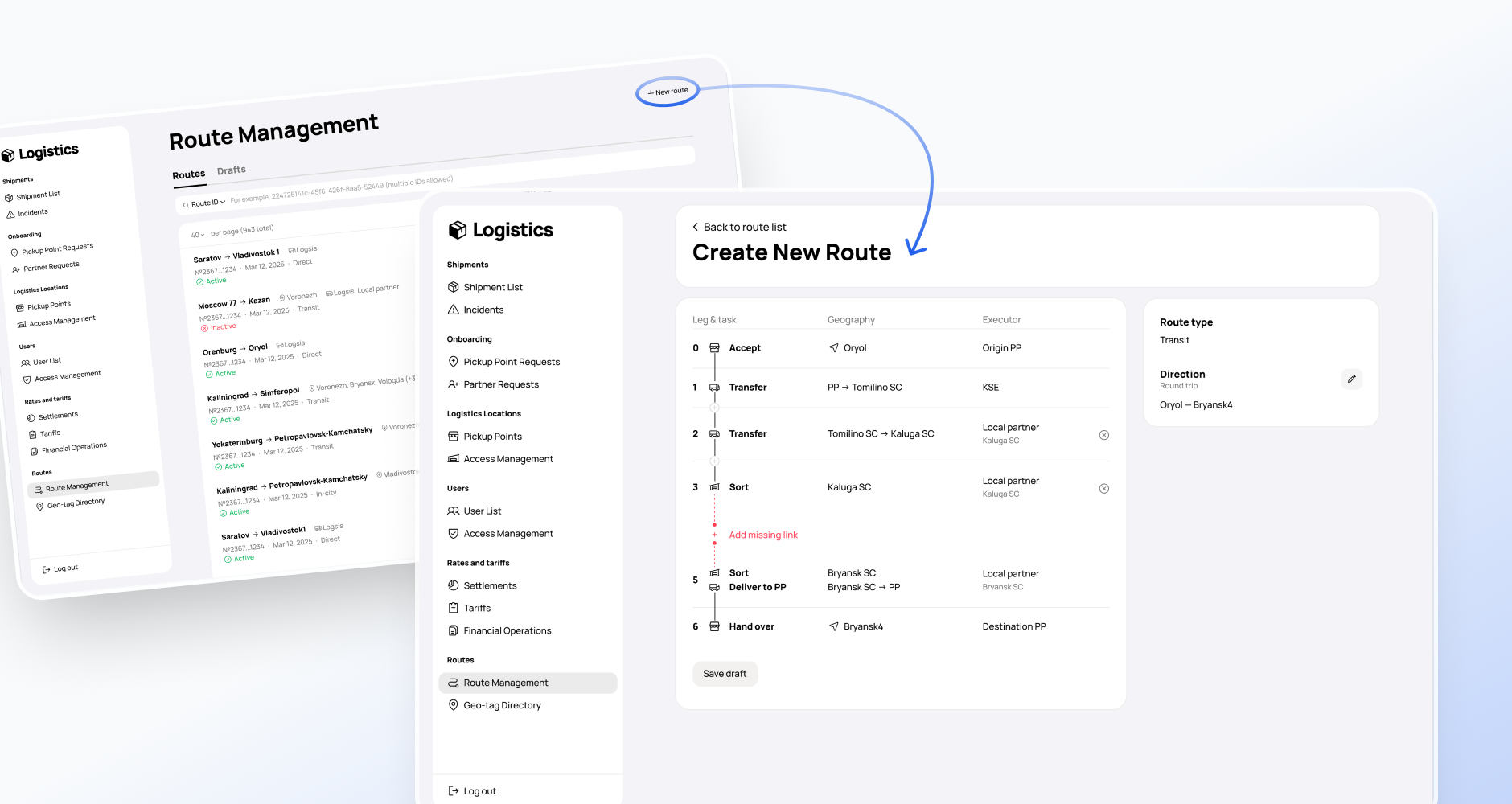
The goal was to let logistics teams create and update route logic inside the platform — for example, when connecting a new geo-tag or configuring a new route sheet.
Previously, this work relied heavily on spreadsheet exports and manual handling. As the network grew, the cost of route errors became much higher: one wrong configuration could affect many shipments, pickup points, delivery times, and customer experience.
The challenge was not only to model route logic in the interface, but also to make incomplete or invalid routes visible before activation. I focused on making gaps in the route sheet explicit, blocking invalid activation, and adding safeguards around critical actions.
This flow shows how the platform balanced operational flexibility with strong error prevention.
Shipment visibility and rerouting
KEY WORKFLOW 3
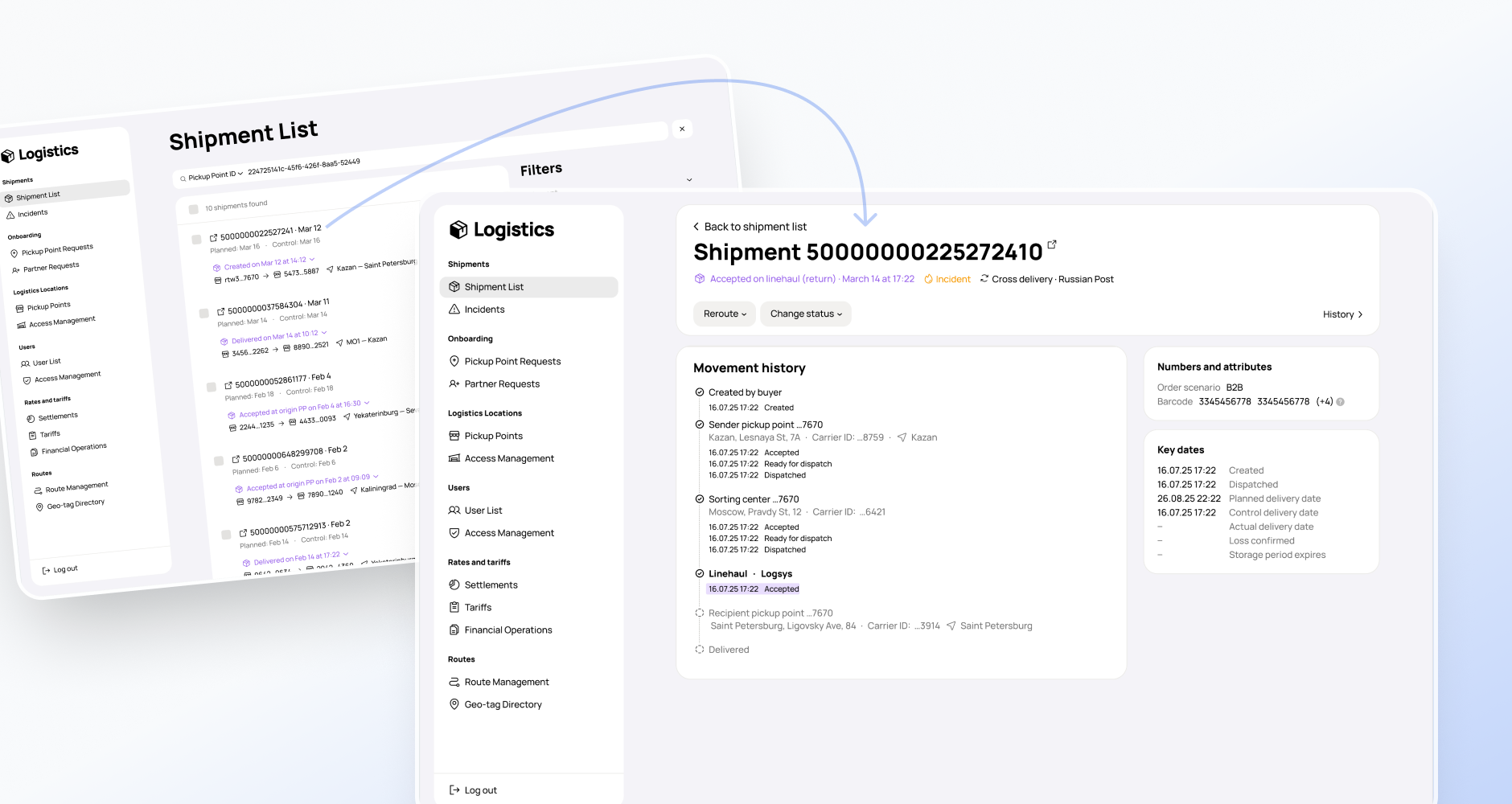
Shipment management was one of the core operational areas of the platform.
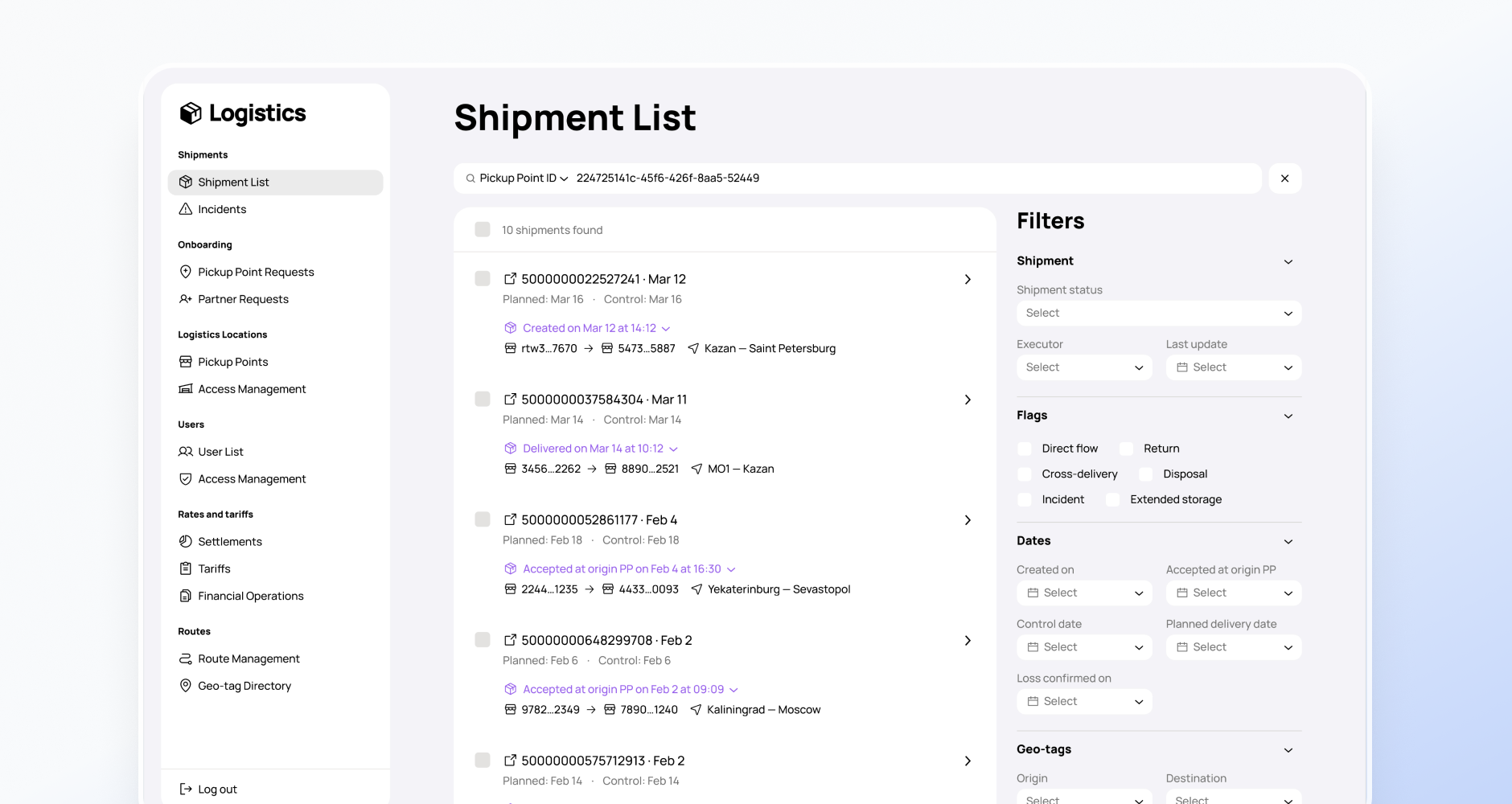
The goal was to give logistics teams a clear view of shipment state, movement history, incidents, return scenarios, and critical dates — and to let them take actions such as status changes or rerouting when needed.
One of the hardest parts here was building a readable status model that worked both for internal users and for the evolving system architecture. The logic had to remain understandable to logistics teams while staying scalable enough for more complex delivery chains later.
A representative scenario was rerouting shipments when a pickup point became temporarily unavailable. The risk was high: users could select the wrong shipments, miss some of them, or apply actions that contradicted the actual shipment state.
To reduce that risk, I worked on clearer status visibility, more precise filtering logic, and safeguards around critical actions. In some cases, this meant making filters more specific than initially planned — for example, separating shipments already at a pickup point from shipments assigned to it but still on the way.
Key design decision
Several design decisions shaped the platform across sections.
Moving from spreadsheet-heavy habits to structured operational views
Operational teams were used to spreadsheets and initially expected dense table-based interfaces across the platform. Instead of reproducing that pattern everywhere, I introduced more structured operational views with stronger status visibility, filtering, and clearer information hierarchy. The goal was not to reduce information density, but to make critical actions and object states easier to scan and manage at scale.
Designing around decision-critical information
A recurring challenge was deciding what belonged in list views and what should remain inside details. This helped keep core views scannable while still supporting deeper operational work.
Building a readable and extensible status model
Status logic had to make sense to logistics teams and support future growth. This required careful work on naming, consistency, and visibility of state transitions.
Standardising terminology across teams and interfaces
Operational language had been inconsistent: the same object could be called an order, parcel, item, or shipment. I pushed for more consistent terminology across product, users, and adjacent teams to reduce confusion and support more accurate communication.
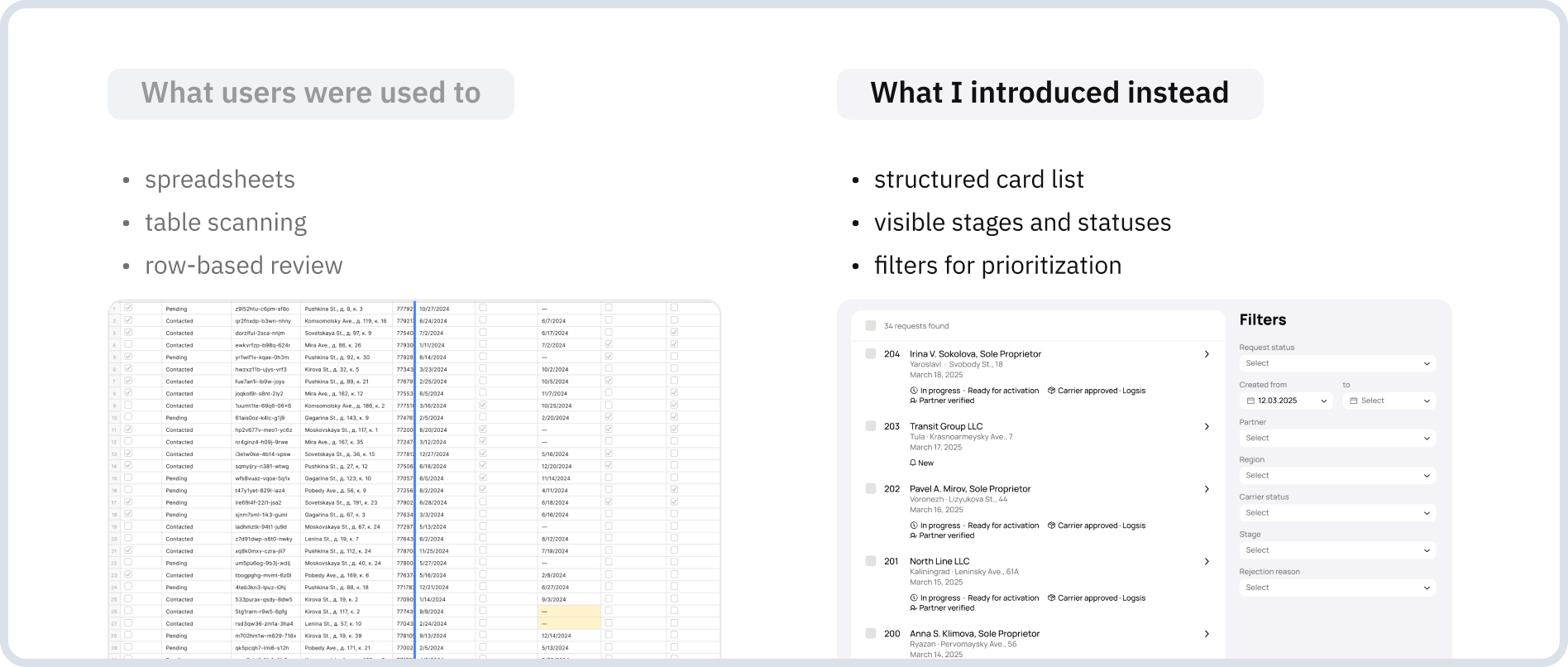
Text description: Before / After
What users were used to
- spreadsheets
- table scanning
- row-based review
What I introduced instead
- structured card list
- visible stages and statuses
- filters for prioritization
Trade-offs and Outcomes
This product required constant trade-offs between clarity and density, speed and long-term structure, and familiarity and better system design.
In some areas, I kept the interaction model closer to what users already understood, especially in critical operational scenarios. In others, I deliberately moved away from old habits when they no longer served the product well — for example, by not defaulting to table-heavy layouts or by introducing more explicit validation and restrictions around risky actions.
The goal was not to create a perfect greenfield system in one step, but to build a platform that worked in reality, could keep growing, and would not break under scaling pressure.
The result was not just a set of screens, but the foundation of a unified internal logistics platform. It gave teams a single operational workspace for several key logistics areas, reduced dependence on scattered tools and manual checks, and supported the rollout of new workflows needed for network growth.
Other outcomes included:
- more automation in repetitive operational steps
- support for batch actions in high-volume workflows
- reusable UX patterns and components for faster growth of new sections
- clearer shared terminology across users and adjacent teams
- stronger product consistency as the platform expanded